

☕ 12–14 min read
MCP, Action Fabric, Workflow Data Fabric and Context Engine, a practical look at what sits behind the ServiceNow AI experience and helps move work from intent to governed action.
A few weeks ago, what looked like one ServiceNow AI article quickly turned into a much bigger research exercise. One announcement led to another, one product page opened another tab and suddenly we had considerably more reading material than planned.
The pace has not slowed down.
Working deeply on a customer architecture and stepping out to map everything that is changing across the wider ServiceNow ecosystem are two different modes of work. Both matter. At Devhd, most of our days are spent in delivery; every so often, we deliberately step out of delivery mode, follow the announcements, documentation and product changes and connect them back to the platform we work with every day.
This series is our attempt to turn some of that research into a shortcut for others working with ServiceNow: architects, consultants, developers, sales and presales teams, customers and technology leaders who know the platform but may not have had time to open every new tab themselves.
A quick update to the map
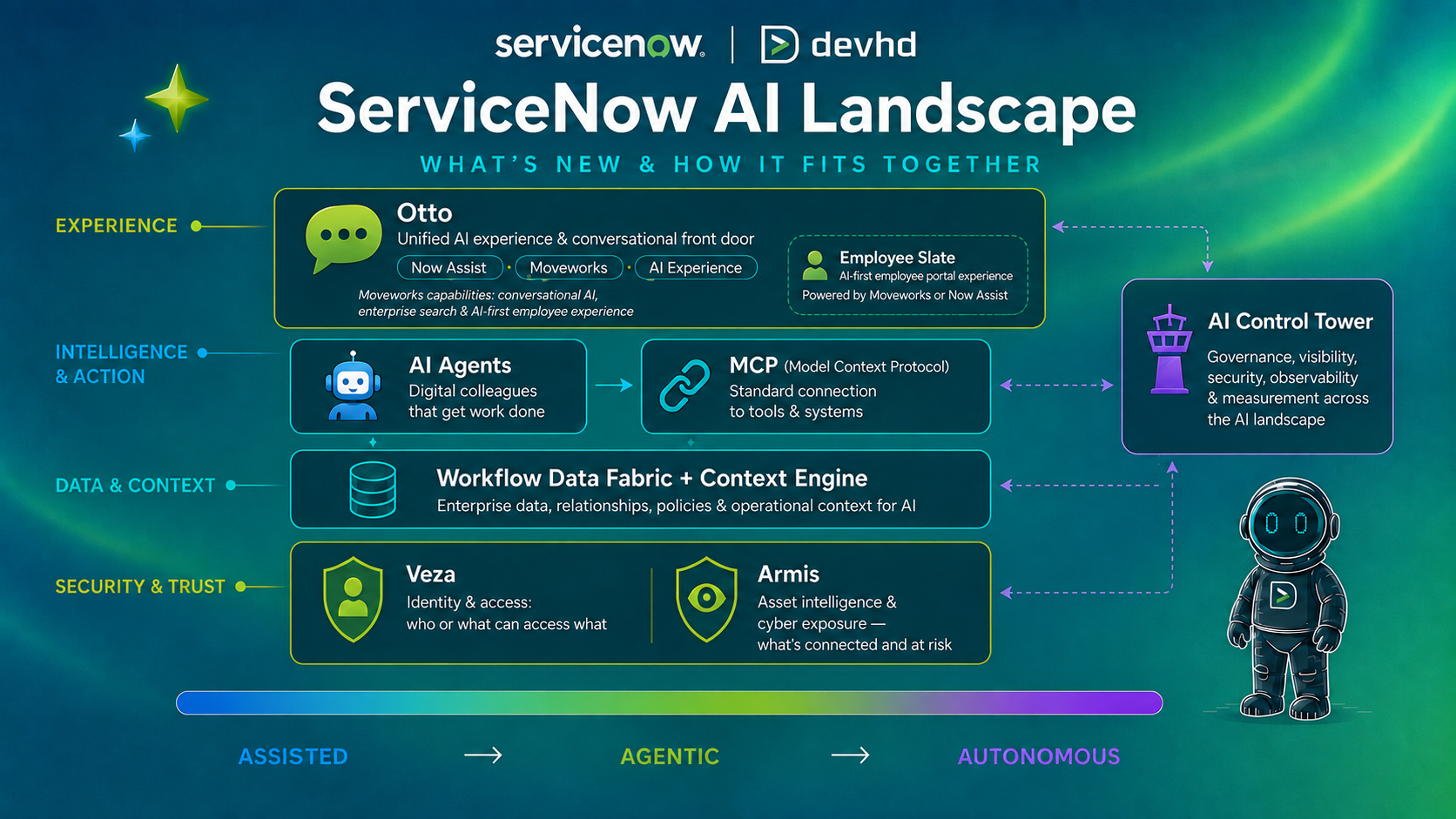
Since we published Part 1 – ServiceNow AI Landscape: What’s New and How It Fits Together, two things have already changed at the experience layer.
ServiceNow has moved the Employee Slate product family under EmployeeWorks, with the Moveworks-powered experience now called EmployeeWorks Web App, while Employee Slate built for Now Assist currently keeps its name.
ServiceNow has also introduced Flow by ServiceNow, a new conversational AI-native service desk designed to resolve requests in channels such as Slack and Microsoft Teams and automate repeat work.
If anything, those changes reinforce the point of this series: the experience layer will keep evolving. Understanding what sits underneath it is more durable.
If Part 1 was a map of the building, Part 2 takes us behind the reception desk.
The question throughout this article is simple: once AI understands what someone wants, how does it get the context, tools and governed access it needs to actually do something about it?
Understanding the request is only the beginning
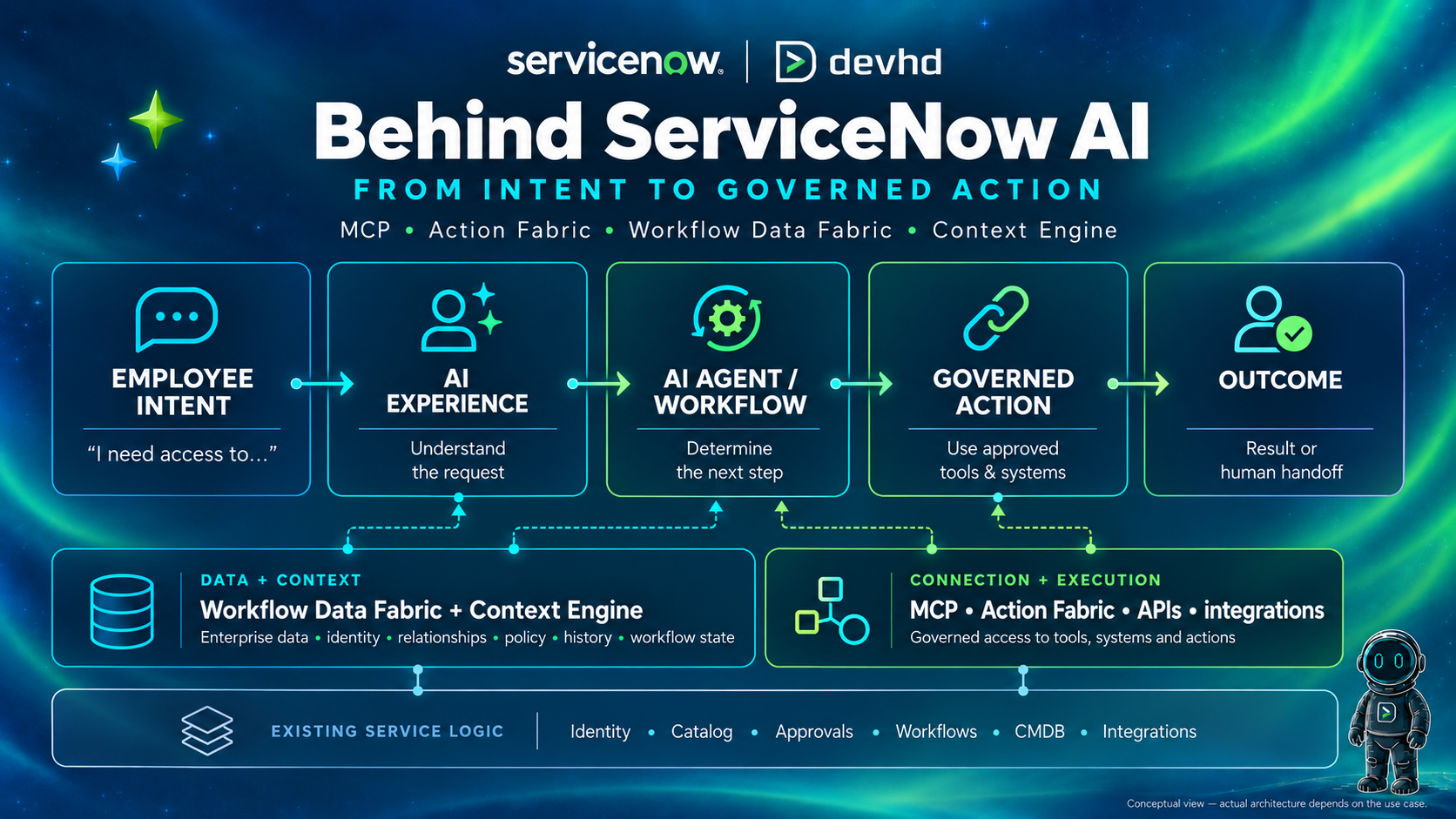
Imagine an employee says:
“I need access to the project analytics workspace until the end of October.”
The sentence itself is not the difficult part. The challenge is everything that has to happen behind it before the request can be fulfilled.
Who is the employee? Which project are they working on? What level of access do they need? Is temporary access allowed? Does a manager need to approve it? Which system actually provisions access? What happens if the target system fails?
The system needs the right data, enough context to understand the situation, access to the right tools and the existing rules that decide what is allowed to happen.
That is what turns a natural-language request into something the platform can actually work with.
MCP: a common way for AI to use tools
In Part 1, we described MCP — Model Context Protocol — as something like USB-C for AI connections. The analogy is still useful: instead of inventing a completely different connection every time an AI system needs to use a tool, MCP gives compatible AI clients and tools a common protocol for discovering and invoking capabilities.
The important word is tools. An AI Agent may understand that it needs to check access, retrieve information or perform an action. MCP can give that agent a standard way to discover that an appropriate tool exists and call it.
But one distinction matters immediately: the connection can go in either direction around ServiceNow.
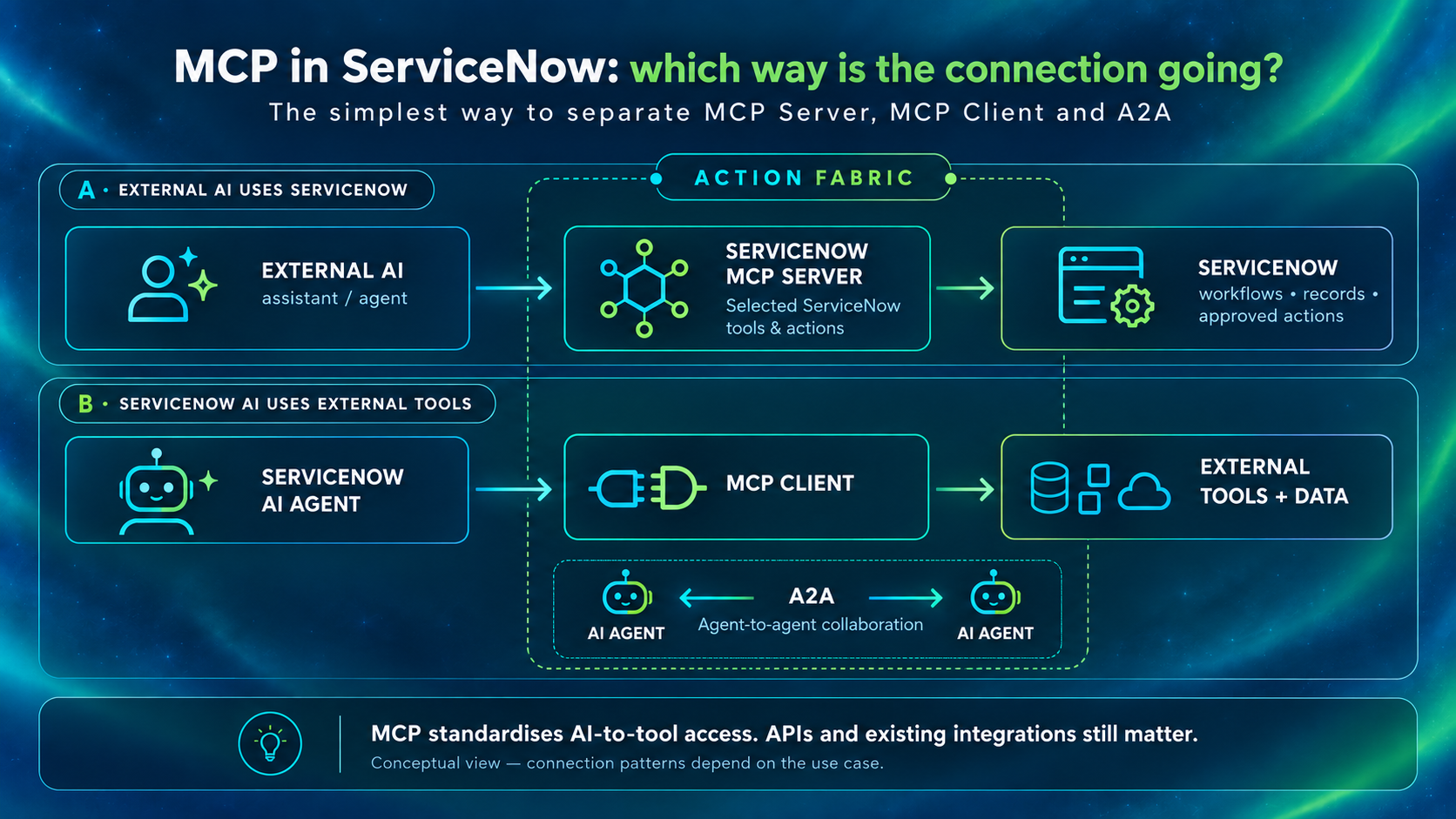
MCP Server vs MCP Client: which way is the connection going?
If an AI system outside ServiceNow needs to use selected ServiceNow capabilities, ServiceNow can act as an MCP Server. Administrators decide which capabilities are exposed and the platform controls what the external client is allowed to invoke.
Direction: External AI → ServiceNow
Reverse the situation. If a ServiceNow AI Agent needs to use an external tool exposed through MCP, ServiceNow can act as an MCP Client and call the approved external capability.
Direction: ServiceNow AI → external tool or system
So where does Action Fabric fit?
This is where two terms are easy to mix up.
MCP is the protocol. Action Fabric is ServiceNow’s framework for connecting AI agents to governed enterprise actions and systems.
MCP is the plug standard; Action Fabric is the enterprise switchboard.
The plug standard defines a common way to connect. The switchboard helps route those connections into approved enterprise actions, using MCP, A2A and other supported patterns.
In ServiceNow, the record is only part of the story. What matters just as much are the rules around it: approvals, workflows, SLAs, playbooks and permissions.
ServiceNow uses Action Fabric to make those governed actions available to ServiceNow and third-party AI agents while keeping the platform controls in place.
MCP does not replace APIs
If a deterministic integration already does its job reliably, there is no prize for replacing it with MCP. APIs, Integration Hub, spokes and established integrations still matter. MCP becomes especially useful when AI agents need a standard way to discover and use approved tools dynamically. The right question is not “How do we use MCP everywhere?” but “What is the right connection pattern for this work?”
Connecting to a tool is not enough: AI also needs the right data
Our employee is still waiting for access to the project analytics workspace. An agent may now have a way to call a tool. But before acting, it still needs to know whether it should.
More data is not automatically better AI. The useful part is having the right data, in the right context, at the moment a decision needs to be made.
Workflow Data Fabric: connect, contextualize and control enterprise data
Enterprise data rarely lives in one place. Employee information may sit in an HR system. Access information may live in an identity platform. Customer data may live in CRM. Operational data may come from monitoring tools, streams, content repositories or ServiceNow itself.
ServiceNow describes Workflow Data Fabric as its data foundation for bringing enterprise information into the flow of work and AI. Its role is to connect, contextualize and control data from different sources.
Think of a fabric made from many different threads.
The threads stay different, but they are woven together so they can be used as one piece.
In practice, that does not necessarily mean copying everything into one new database. ServiceNow can work with different types of data and connection methods, including integrations, streaming data, external content and zero-copy approaches.
What matters for the workflow or AI Agent is that the relevant information can be brought together when it is needed, with the right context and controls around it.
For architects: Workflow Data Fabric is broader than a single integration mechanism. It brings together capabilities such as Integration Hub, streaming, external content access and zero-copy connectivity under a common data foundation for workflows and AI.
Context Engine: data is not the same as decision context
Now imagine two people asking for access to exactly the same application. The request text is identical. The application is identical.
But one person is an employee assigned to the project. The other is a contractor whose access expired yesterday.
Same data object. Different context. Different decision.
This is where ServiceNow’s Context Engine becomes easier to understand. Workflow Data Fabric can make enterprise data connected, contextualized and governed. Context Engine is the intelligence layer that assembles the situation that matters for a particular decision: intent, identity, permissions, history, policy, relationships and the current workflow state.
Another analogy: Workflow Data Fabric can get the right information into the room. Context Engine is the experienced colleague who understands which parts of that information matter right now.
That is also why enterprise context is more than simply retrieving a relevant document. A useful answer might be grounded in knowledge. A safe action may also depend on identity, policy, historical activity and what is already happening in the workflow.
| Layer | A simple distinction to keep |
|---|---|
| Workflow Data Fabric | Make enterprise data connected, contextualized and governed. |
| Context Engine | Assemble the context that matters for this AI decision, now. |
| MCP / Action Fabric | Provide governed ways to reach tools, systems and actions. |
Architect note: where does RaptorDB fit?
For everyone else, the simplest way to think about it is this:
Workflow Data Fabric helps ServiceNow work with data from across the enterprise. RaptorDB is about handling ServiceNow’s own platform data fast, at scale, for both day-to-day transactions and analytics.
You do not need to understand RaptorDB to follow MCP, Action Fabric or Context Engine. But architects will reasonably ask where it belongs in the picture.
On the ServiceNow platform side, RaptorDB Pro is the high-performance HTAP option designed to run transactional and analytical workloads against the same live platform data. In practical terms, ServiceNow can work with operational data and analytical queries on the same underlying data foundation, with less need to move or duplicate that data into separate analytical pipelines.
So the short version is:
Workflow Data Fabric = how enterprise data is connected and made usable across workflows and AI.
RaptorDB Pro = the high-performance HTAP option for running transactional and analytical workloads on live ServiceNow data.
Putting it together: from one sentence to a governed action
Let’s return to the original request:
“I need access to the project analytics workspace until the end of October.”
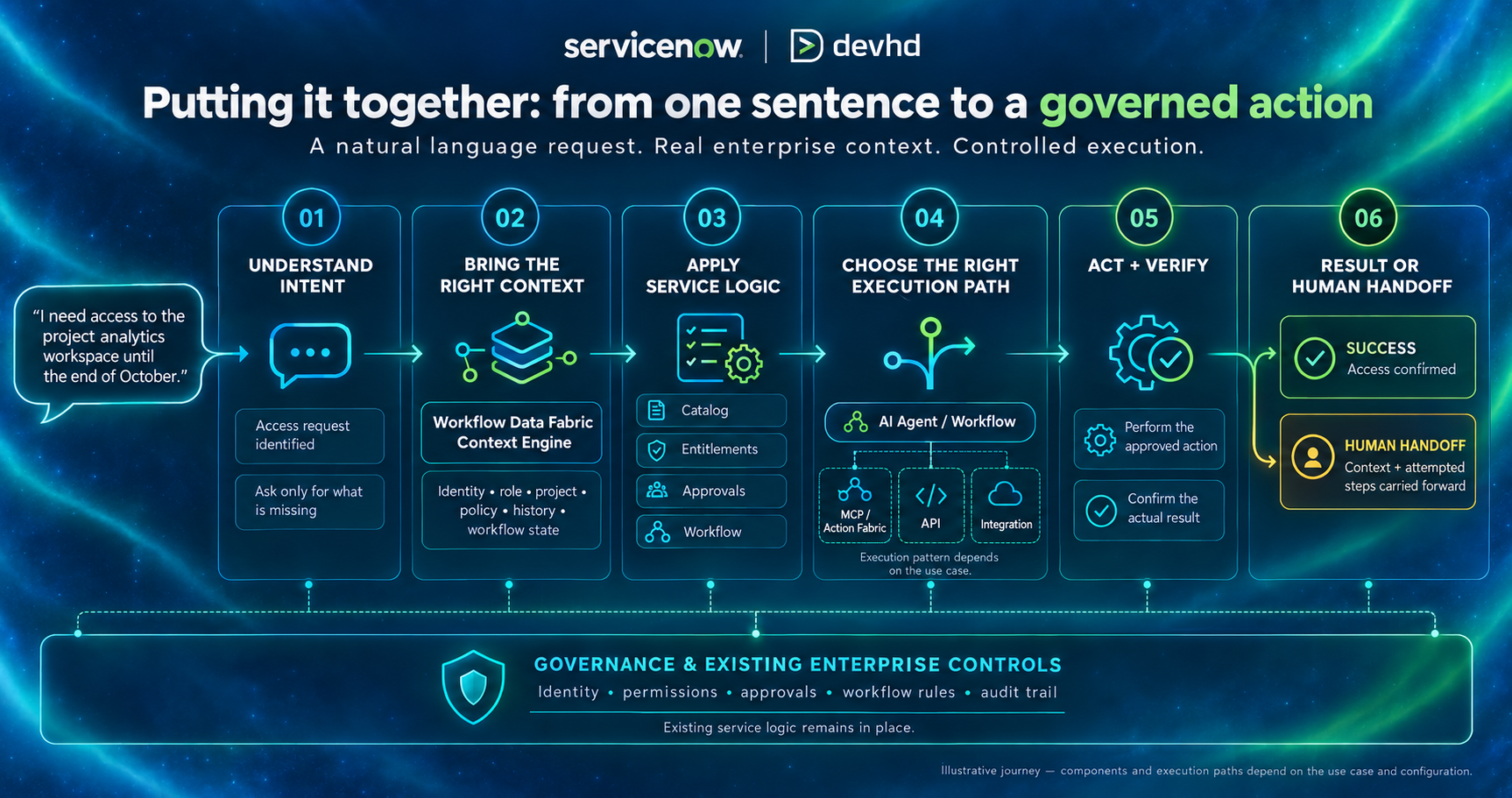
- Understand the intent
The experience identifies an access request and determines what is still missing. Maybe the application is clear but the access level is not. Instead of forcing the employee to understand the internal service catalog, the experience can ask a useful follow-up question.
- Bring in the relevant data and context
Workflow Data Fabric can make relevant enterprise data available across connected systems. Context Engine can assemble the business situation around that data: identity, role, project, policy, history and current workflow state.
- Apply the service logic that already exists
The request does not stop needing entitlements because AI understood it. Manager approvals do not disappear. Identity controls do not disappear. Catalog logic, workflows and business rules still determine what the employee is allowed to receive and under what conditions.
- Choose the right execution path
An existing workflow may handle the request directly. A ServiceNow AI Agent may use an approved tool. MCP / Action Fabric may be appropriate for an AI-driven tool interaction. An API, spoke or existing integration may still be the best path for a predictable system-to-system action.
- Act and verify
The approved action is performed and the process should confirm the actual result; not merely assume that a request sent to another system succeeded.
- Complete the work or hand it to a person
If everything works, the employee gets the outcome. If an approval is denied, the target system fails, the request is ambiguous or a defined boundary is reached, the process can stop or hand the work to a person with the context and attempted steps already carried forward.
Agentic does not mean “remove the human”
It means allowing more of the understood, repeatable and governed parts of the work to progress without requiring a person to manually drive every step. Human approval, exception handling and handoff remain part of the design where the risk or ambiguity calls for them.
What does not disappear underneath all this AI?
Most ServiceNow customers are not starting from a blank page here. A lot of the operating logic AI needs is already in place.
Knowledge and service definitions
Catalog and request models
Workflows and business rules
Approvals and entitlements
Identity and access controls
CMDB and foundation data where the use case depends on them
APIs and integrations
Ownership, auditability and governance
An agent connected to poor data does not magically create good data. A natural-language front door does not repair a broken fulfilment process. Giving AI access to more tools does not remove the need to decide what it should be allowed to do.
A quick reference
| Question | Think of |
|---|---|
| How can AI discover and use tools through a common standard? | MCP |
| How can external AI use selected ServiceNow capabilities? | MCP Server within Action Fabric |
| How can ServiceNow AI Agents use external MCP tools? | MCP Client within Action Fabric |
| How can two AI agents collaborate directly? | A2A |
| How can enterprise data across systems become usable for ServiceNow AI and workflows? | Workflow Data Fabric |
| What helps assemble the context that matters for the current AI decision? | Context Engine |
| What powers high-performance transactional + analytical processing on live ServiceNow data? | RaptorDB Pro |
| Do these replace workflows, approvals, identity, APIs or integrations? | No — they work with the existing operating model |
The bigger picture
When we started looking more closely at all these changes, it was easy to treat them as separate announcements: a new protocol here, a new data layer there, another product name to remember.
But once you put them next to each other, the picture starts to make more sense.
MCP, Action Fabric, Workflow Data Fabric and Context Engine are doing different jobs, but they are all part of the same direction of travel: helping AI move beyond answering questions and into the actual flow of enterprise work.
That does not mean every request will suddenly become autonomous, or that existing workflows, approvals and controls disappear. Quite the opposite. A lot of what makes this useful is that the AI can work with what is already there.
And maybe that is the most useful takeaway from Part 2.
The names will keep changing. New products will keep appearing. ServiceNow is moving fast enough that, by the time you finish reading one set of docs, there is usually another tab worth opening.
What helps is having a clearer mental model of what sits where.
That is what we are trying to do with this series at Devhd: not cover every announcement, but make the important changes easier to place.
Next in the Devhd ServiceNow AI series
Part 3 will move from connection and execution to governance: AI Control Tower and the question that appears once an enterprise has many agents, models, identities, MCP servers and AI use cases running at the same time: who knows what is operating, what it can access, whether it is compliant and whether it is creating value?
Article by Nicoleta Daniș, Marketing & Communications at Devhd